
Air Tag Detector: Find & Track
MONIQ TAP., CO LTDTools
4.5241.00 Reviews
- Version
- 3.4
- Installs
- 100.00K
- Age Rating
- Everyone
Screenshots
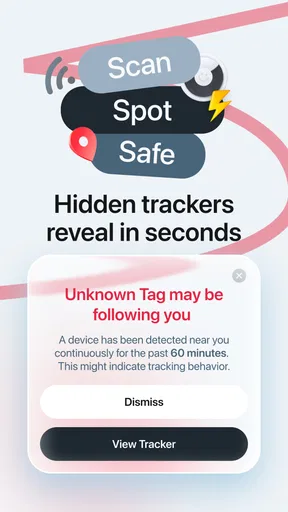
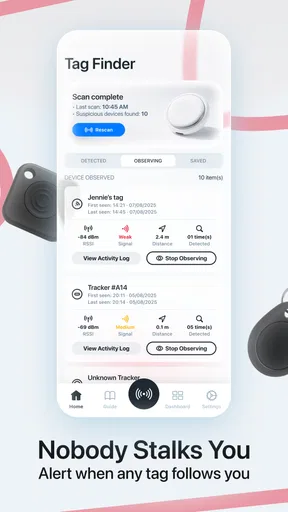
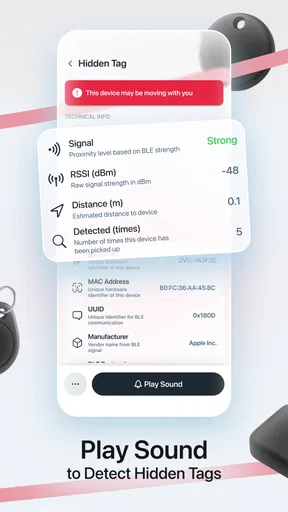
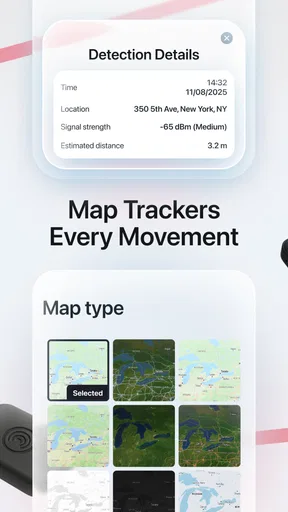
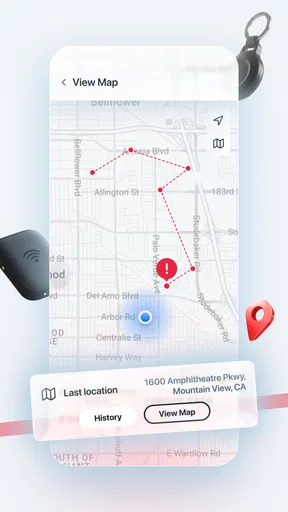
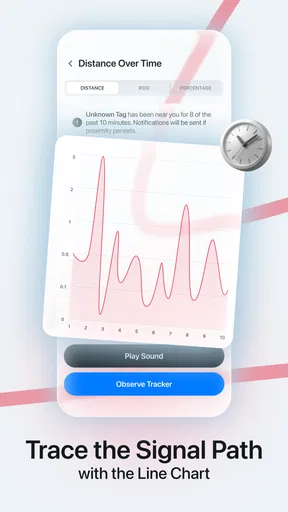
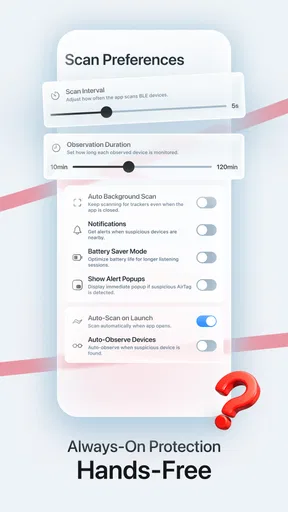
Our Review of Air Tag Detector: Find & Track
 Analysis by Appyee
Air Tag Detector: Find & Track is the kind of tools app I would keep available for a very specific reason: checking whether an unknown AirTag-style tracker may be traveling with me. Its purpose is easy to understand, but the experience depends heavily on how carefully you use it. A detector is not a magic privacy shield, and a quiet result should not be treated as absolute proof that nothing is nearby.
After spending time with the app, I see its value in giving ordinary phone users a more direct way to investigate an uncomfortable situation. It can be useful after finding an unfamiliar tracker, while traveling with luggage, or when a phone notification raises questions. The important part is knowing how to interpret a scan, repeat it sensibly, and separate an app problem from a limitation of wireless detection itself.
Getting past the first points of friction
The app comes from MONIQ TAP., CO LTD and is offered as a free download for everyone. It supports devices running Android 8.0 or later, which makes it accessible to many older phones as well as newer models. The current release is version 3.4, and the app has reached over 100 thousand installs with a 4.5 average from around 6.5 thousand ratings. Those figures suggest that the basic idea is resonating, although they do not remove the need to use the tool carefully.
The first place users can get stuck is expecting the scan to behave like a camera search. It does not give you a visual map of every object in a room. Instead, this type of tool depends on the phone noticing compatible wireless signals in the surrounding area. That means the result can change as you move, wait, or remove nearby sources of interference. I found it more useful to think of a scan as an investigation rather than a one-tap verdict.
Another common stumbling block is starting the search in a crowded environment. Airports, apartment buildings, offices, public transport, and busy cafés can contain many phones and wireless accessories. A detection in one of these places is worth examining, but it is not automatically evidence that someone is following you. Conversely, a busy environment can make it harder to understand which signal matters. Moving to a quieter location is often a better next step than repeatedly pressing the scan control.
The most useful habit is to treat every result as something to verify, not something to panic about. If the app reports a nearby tracker, I would first note where I was standing, whether the result remained present, and whether it changed as I moved. That simple discipline helps distinguish a device that is actually traveling with you from a signal that belongs to a nearby stranger or a stationary object.
What I would check before blaming the app
Before scanning, I would make sure the phone’s wireless connection is active and that the app can perform its intended search. I would also close anything that might make the phone unusually busy, then hold the device in a consistent way while walking slowly through the area. These are not complicated technical steps, but they reduce confusing changes caused by rushed movement or an unstable phone state.
Location is another practical consideration. If you are checking a backpack, car, hotel room, or coat, scan while moving around the whole space rather than standing in one spot. A tracker hidden in a side pocket may be easier to investigate when you approach from different directions. If you are checking a vehicle, include the cabin and storage areas you can safely inspect, but do not dismantle anything or put yourself in danger to chase an uncertain signal.
I would also remove obvious personal Bluetooth accessories temporarily if the situation allows it. Headphones, watches, speakers, and other familiar devices can complicate your interpretation of what the phone notices. The goal is not to empty an entire room of electronics; it is simply to reduce the number of known signals competing for your attention while you repeat the check.
Because this is a privacy-focused tool, users may wonder whether it can identify every tracker. I would not rely on it as a universal detector. Its usefulness is tied to the kinds of signals it can recognize and to what the phone can observe at that moment. A tracker may be out of range, shielded, inactive, surrounded by interference, or simply not behaving in a way the app can identify. That is why a negative scan is reassuring only within the limits of the situation.
A safer workflow when the result looks suspicious
My preferred workflow begins with a calm first scan. I would stay in the same general area long enough to see whether the result is repeatable, then move several steps away and scan again. If the indication follows me, I would continue checking from different parts of the space. If it disappears immediately after leaving a location, it may have belonged to that place rather than to my belongings.
When checking luggage, I would place the bag away from other travelers’ possessions and inspect each compartment methodically. I would not assume that the loudest or earliest result points directly to the tracker. Wireless behavior can be affected by walls, metal, furniture, and the position of the phone. A slow search around the outside followed by a careful look through accessible pockets is more sensible than pulling everything apart at once.
If a scan stops unexpectedly or seems inconsistent, I would avoid repeating the exact same action over and over. Instead, I would restart the app, confirm the phone’s wireless functions are active, and try again in a different position. If the phone is very low on battery or running hot, giving it a short break may help. These are general recovery steps rather than guarantees, but they are more productive than assuming every irregular result means a hidden device.
A useful advanced tip is to record the context of each check. I would write down the location, approximate time, whether I was indoors or outdoors, and what changed between scans. This creates a simple pattern. A signal that appears only near one parked car is different from one that remains associated with your bag across several locations. The app becomes much more valuable when its results are combined with this kind of observation.
When the app is not the real problem
Some disappointing results are caused by the environment rather than by Air Tag Detector: Find & Track. Thick walls, metal cases, crowded wireless spaces, and distance can all affect what a phone notices. A tracker inside a vehicle or tightly enclosed luggage may not produce the same result as one sitting in an open room. If the result changes, that does not automatically mean the app is broken.
Phone differences matter too. Two devices can behave differently in the same place because their wireless hardware, software settings, battery condition, or background activity are not identical. If you are helping someone else investigate a concern, do not compare the screens as though they were laboratory instruments. Repeat the check under similar conditions and focus on consistent patterns instead.
It is also possible to mistake an ordinary personal device for a threat. A forgotten accessory, a family member’s item, or a tracker attached to shared property can produce a confusing moment. Before taking action, I would ask whether the object could have a legitimate owner and whether the signal remains connected to my belongings after I leave the original location. That pause can prevent an unnecessary confrontation.
At the same time, caution should not turn into dismissal. If you repeatedly find an unfamiliar tracker attached to your property, feel unsafe, or suspect someone is monitoring you, preserve the relevant details and seek help from a trusted person or appropriate local authorities. Do not confront a potentially dangerous person alone. The app can support an investigation, but it cannot replace personal safety planning or professional assistance.
Who will get the most from this tool
I think this app suits travelers, students, commuters, and anyone who wants a straightforward way to investigate an unfamiliar AirTag-type signal. It is especially practical for people who do not want to learn a complicated security system just to check a suitcase or personal vehicle. The free entry point makes it easy to try, while the Everyone content rating keeps the presentation broadly approachable.
A realistic example would be returning from a trip and noticing an unfamiliar item in a backpack. I would move the bag away from other luggage, run a scan, walk around it, and check again after removing familiar accessories from the immediate area. If the indication stays associated with the bag, I would inspect its outer pockets and lining without damaging anything. If the result appears only in the airport or hotel lobby, I would treat it as a nearby signal until further checks suggest otherwise.
The app is less suitable for someone who needs guaranteed professional-grade surveillance detection, detailed forensic evidence, or a complete inventory of every wireless device nearby. It is also not the right choice for users who want a general Bluetooth management tool or a full device-security suite. Those alternatives may offer broader controls, while this app is more focused on a single privacy concern.
Compared with relying only on occasional operating-system alerts, a dedicated detector can feel more intentional because you can choose when to investigate. That is useful when you have a specific concern. However, built-in phone safety features may still be important because they can provide a different kind of warning. I would use this app as one layer in a sensible privacy routine, not as a replacement for the phone’s own protections or common-sense inspection.
Free access and the paid layer
The app is free to start, with optional in-app purchases ranging from $1.99 to $34.99 per item. I would approach those purchases carefully. The central question is whether the free experience already covers the checks you actually need. Paying does not change the physical limits of wireless detection, so I would not purchase anything expecting it to reveal a tracker that is out of range, shielded, or incompatible with the app’s detection method.
For occasional travelers, a free privacy check may be enough. Someone who uses the app repeatedly may find extra paid functionality worthwhile, but I would judge that based on the specific tools shown inside the app rather than on the promise of stronger certainty. The sensible trade-off is convenience versus frequency of use, not “paid means perfect.”
One minor source of friction is that privacy anxiety can make users want immediate certainty. The app cannot provide that in every situation. You may need to repeat a search, change location, inspect belongings manually, or ask another person to help. That makes the experience less effortless than a typical utility, but it is also why honest interpretation matters more than a polished interface.
My practical verdict after using it
Air Tag Detector: Find & Track is a focused Android tools app that can give people a useful starting point when they are worried about an unknown AirTag-style tracker. I like its narrow purpose, accessible age rating, free starting point, and compatibility with older Android devices. The strong average rating and growing install base also make it a reasonable app to consider rather than an obscure experiment.
My recommendation comes with a clear condition: use it methodically. Scan in a quiet place, move around the object or room, repeat the check, remove familiar sources of confusion when practical, and write down what changes. If a result remains associated with your belongings, take the concern seriously and prioritize safety. If the result appears only in a crowded location or vanishes when you leave, investigate before drawing conclusions.
I would recommend it to someone who wants a simple, dedicated check for a specific privacy worry. I would skip it if I needed a complete security audit, guaranteed detection of every tracking technology, or detailed evidence suitable for technical investigation. For everyday peace of mind, though, it can be worthwhile—as long as you remember that a detector is an aid to careful checking, not a substitute for judgment.
Verdict
Strengths of Air Tag Detector: Find & Track
- Quickly scans for nearby Bluetooth trackers and unknown AirTags.
- Simple interface makes the app easy to use for nontechnical users.
- Can help identify trackers that may be following your movements.
- Useful for checking hotel rooms, rental cars, and shared spaces.
- Provides an extra privacy check alongside your phone’s built-in alerts.
Limitations of Air Tag Detector: Find & Track
- Bluetooth scans may detect many harmless nearby devices.
- Results can vary depending on distance, obstacles, and phone hardware.
- Some features may require payment or include advertising.
- It cannot guarantee that every hidden or inactive tracker will be found.
- Frequent scanning may increase battery consumption.
Other Releases by MONIQ TAP., CO LTD
View All
Car Play Connect Auto Sync
Auto & Vehicles4.4

OBD2 Car Scanner: Torque ELM
Auto & Vehicles4.1

Remote Control for Onn Roku TV
House & Home4.6
Similar Picks in This Category
View All
Google LLC4.0

Gboard - the Google Keyboard
Google LLC4.5

Google Play services
Google LLC4.3

Google Play Store
Google LLC4.9

Files by Google
Google LLC4.5

SHAREit: Transfer, Share Files
Smart Media4U Technology Pte.Ltd.4.3
Frequently Asked Questions
What is Air Tag Detector: Find & Track used for?
Air Tag Detector: Find & Track is designed to help you identify nearby Bluetooth tracking devices, such as Apple AirTags and other compatible trackers. After scanning the surrounding area, it may show detected devices and provide information intended to help you recognize unfamiliar trackers. It is useful for privacy checks, but it should be treated as an additional tool rather than a guaranteed way to find every tracking device.
How does Air Tag Detector: Find & Track detect nearby trackers?
The app generally relies on your phone’s Bluetooth capabilities to scan for discoverable tracking devices in the surrounding area. For the best results, Bluetooth and any permissions requested by the app must be enabled, and you may need to move around slowly while scanning. Detection can be affected by walls, distance, interference, battery level, and whether a tracker is actively broadcasting its signal.
Can Air Tag Detector: Find & Track find every hidden AirTag or tracker?
No detection app can promise that every hidden tracker will be found. AirTags and similar devices may not always be visible during a scan, especially when they are far away, shielded, inactive, or affected by Bluetooth interference. The app can provide helpful indications, but results should be checked carefully. If you feel unsafe, consider contacting local authorities or a trusted security professional.
Does the app need special permissions or access to personal information?
Air Tag Detector: Find & Track may request Bluetooth, nearby-device, location, or notification permissions depending on your device and operating system. These permissions can be necessary for scanning, even when the app does not need your exact location for mapping. Before using it, review the permission prompts and the developer’s privacy policy. Avoid granting access that seems unrelated to the app’s tracking-detection purpose.
Is Air Tag Detector: Find & Track free to download and use?
The app may be available as a free download while offering optional in-app purchases, subscriptions, advertising, or premium scanning features. Pricing and included tools can vary between Android and iOS versions and may change after installation. Before starting a trial or subscription, check the store listing carefully, including renewal terms and cancellation instructions, so you understand any potential charges.
